# SonarQube Quality Gate check [](https://github.com/SonarSource/sonarqube-quality-gate-action/actions/workflows/ci.yml)
Check the Quality Gate of your code with [SonarQube Server](https://www.sonarsource.com/products/sonarqube/) or [SonarQube Community Build](https://www.sonarsource.com/open-source-editions/sonarqube-community-edition/) to ensure your code meets your own quality standards before you release or deploy new features.
[SonarQube Server](https://www.sonarsource.com/products/sonarqube/) and [SonarQube Community Build](https://www.sonarsource.com/open-source-editions/sonarqube-community-edition/) are widely used static analysis solutions for continuous code quality and security inspection.
They help developers detect coding issues in 30+ languages, frameworks, and IaC platforms, including Java, JavaScript, TypeScript, C#, Python, C, C++, and [many more](https://www.sonarsource.com/knowledge/languages/).
## Requirements
A previous step must have run an analysis on your code.
Read more information on how to analyze your code for SonarQube Server [here](https://docs.sonarsource.com/sonarqube-server/latest/devops-platform-integration/github-integration/introduction/) and for SonarQube Community Build [here](https://docs.sonarsource.com/sonarqube-community-build/devops-platform-integration/github-integration/introduction/)
## Usage
The workflow YAML file will usually look something like this::
```yaml
on:
# Trigger analysis when pushing in master or pull requests, and when creating
# a pull request.
push:
branches:
- master
pull_request:
types: [opened, synchronize, reopened]
name: Main Workflow
jobs:
sonarqube:
runs-on: ubuntu-latest
steps:
- uses: actions/checkout@v4
with:
# Disabling shallow clone is recommended for improving relevancy of reporting.
fetch-depth: 0
# Triggering SonarQube analysis as results of it are required by Quality Gate check.
- name: SonarQube Scan
uses: sonarsource/sonarqube-scan-action@master
env:
SONAR_TOKEN: ${{ secrets.SONAR_TOKEN }}
SONAR_HOST_URL: ${{ secrets.SONAR_HOST_URL }}
# Check the Quality Gate status.
- name: SonarQube Quality Gate check
id: sonarqube-quality-gate-check
uses: sonarsource/sonarqube-quality-gate-action@master
with:
pollingTimeoutSec: 600
env:
SONAR_TOKEN: ${{ secrets.SONAR_TOKEN }}
SONAR_HOST_URL: ${{ secrets.SONAR_HOST_URL }} #OPTIONAL
# Optionally you can use the output from the Quality Gate in another step.
# The possible outputs of the `quality-gate-status` variable are `PASSED`, `WARN` or `FAILED`.
- name: "Example show SonarQube Quality Gate Status value"
run: echo "The Quality Gate status is ${{ steps.sonarqube-quality-gate-check.outputs.quality-gate-status }}"
```
Make sure to set up `pollingTimeoutSec` property in your step, to avoid wasting action minutes per month (see above example). If not provided, the default value of 300s is applied.
When using this action with [sonarsource/sonarqube-scan](https://github.com/SonarSource/sonarqube-scan-action) action or with [C/C++ code analysis](https://docs.sonarsource.com/sonarqube-server/latest/analyzing-source-code/languages/c-family/overview/) (available only for SonarQube Server) you don't have to provide `scanMetadataReportFile` input, otherwise you should alter the location of it.
Typically, report metadata file for different scanners can vary and can be located in:
- `target/sonar/report-task.txt` for Maven projects
- `build/sonar/report-task.txt` for Gradle projects
- `.sonarqube/out/.sonar/report-task.txt` for .NET projects
Example usage:
```yaml
- name: SonarQube Quality Gate check
uses: sonarsource/sonarqube-quality-gate-action@master
with:
scanMetadataReportFile: target/sonar/report-task.txt
```
### Environment variables
- `SONAR_TOKEN` – **Required** this is the token used to authenticate access to SonarQube. You can read more about security tokens [here](https://docs.sonarqube.org/latest/user-guide/user-token/). You can set the `SONAR_TOKEN` environment variable in the "Secrets" settings page of your repository, or you can add them at the level of your GitHub organization (recommended).
- `SONAR_HOST_URL` – **Optional** this tells the scanner where SonarQube is hosted, otherwise it will get the one from the scan report. You can set the `SONAR_HOST_URL` environment variable in the "Secrets" settings page of your repository, or you can add them at the level of your GitHub organization (recommended).
- `SONAR_ROOT_CERT` – Holds an additional root certificate (in PEM format) that is used to validate the SonarQube certificate. You can set the `SONAR_ROOT_CERT` environment variable in the "Secrets" settings page of your repository, or you can add them at the level of your GitHub organization (recommended).
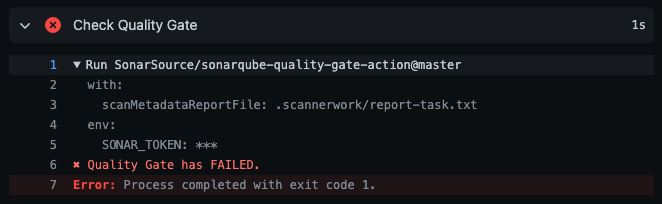
## Quality Gate check run
## Have questions or feedback?
To provide feedback (requesting a feature or reporting a bug) please post on the [SonarSource Community Forum](https://community.sonarsource.com/tags/c/help/sq/github-actions).
## License
Scripts and documentation in this project are released under the LGPLv3 License.

 ## Have questions or feedback?
To provide feedback (requesting a feature or reporting a bug) please post on the [SonarSource Community Forum](https://community.sonarsource.com/tags/c/help/sq/github-actions).
## License
Scripts and documentation in this project are released under the LGPLv3 License.
## Have questions or feedback?
To provide feedback (requesting a feature or reporting a bug) please post on the [SonarSource Community Forum](https://community.sonarsource.com/tags/c/help/sq/github-actions).
## License
Scripts and documentation in this project are released under the LGPLv3 License.